

4.7

Results for microcontroller programmer

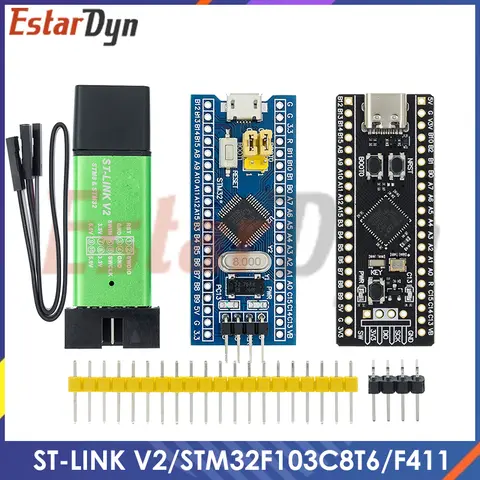
The best microcontroller programmer for most users is a universal programmer that supports a wide range of microcontroller chips, including PIC, AVR, and ARM-based devices. When choosing a programmer, it's essential to consider compatibility, ease of use, and software support. This guide will walk you through the key factors to consider when selecting a microcontroller programmer and provide a step-by-step approach to help you make an informed decision. When users search for microcontroller programmer, they are typically looking for a device that allows them to upload code or firmware to a microcontroller chip. This is a common task in electronics development, especially for hobbyists, engineers, and students working with embedded systems. A microcontroller programmer acts as a bridge between your computer and the microcontroller, enabling you to write and test programs efficiently. To choose the right microcontroller programmer, consider the following scenario: You are working on a project that uses a PIC microcontroller, but you also want the flexibility to work with other types of microcontrollers in the future. Here's how you can approach the selection process:
  1. Identify the microcontroller type you are working with. Common types include PIC, AVR, and ARM-based microcontrollers.
  2. Check the programmer's compatibility with your target microcontroller. A universal programmer is often the best choice for versatility.
  3. Ensure software support is available for your operating system (Windows, macOS, or Linux).
  4. Consider ease of use, including the availability of user guides, tutorials, and community support.
  5. Review user experiences and product ratings to gauge reliability and performance.
The best solution is a universal microcontroller programmer that supports multiple chip families and includes robust software tools. Based on real-world usage and user feedback, the following comparison table highlights some of the top options:
Programmer Supported Microcontrollers Interface Software Support Price Range
USB PIC Programmer PIC16, PIC18, PIC24 USB MPLAB X $20–$50
AVR ISP Programmer ATmega, ATtiny USB Arduino IDE $10–$30
Universal Microcontroller Programmer PIC, AVR, ARM, 8051 USB Multiple IDEs $50–$100
Here are some key definitions to help you understand the terminology:
Microcontroller
A small computer on a single integrated circuit containing a processor core, memory, and programmable input/output peripherals.
Microcontroller Programmer
A device used to transfer code or firmware from a computer to a microcontroller chip.
Programming Microcontrollers
The process of writing and uploading code to a microcontroller to control its behavior.
Universal Microcontroller Programmer
A programmer that supports multiple types of microcontroller chips, offering greater flexibility for different projects.
Microcontroller Code
The software or firmware written to run on a microcontroller, typically in C, C++, or assembly language.
When selecting a microcontroller programmer, it's also important to consider related keywords such as PIC microcontroller programming, microcontroller programming languages, programmable microcontrollers, and microchip programmer. These terms often appear in user searches and can help you better understand the tools and resources available. For example, if you're working with a PIC microcontroller, you may need a PIC programmer that supports microcontroller pic programming. Similarly, if you're using an AVR microcontroller, an AVR ISP programmer would be ideal. A universal microcontroller programmer is a great investment if you plan to work with multiple types of microcontroller chips and programmable microcontrollers.

Microcontroller Programmer: A Comprehensive Guide for Developers and Hobbyists

What is the best microcontroller programmer for beginners?

If you're new to embedded systems and want to start programming microcontrollers, the best microcontroller programmer for beginners is the USBasp or AVR ISP programmer. These devices are affordable, widely supported, and compatible with popular microcontrollers like the ATmega328P used in Arduino boards. To choose the right programmer, consider the following steps:
  1. Identify the type of microcontroller you plan to use (e.g., AVR, PIC, ARM).
  2. Check the programming interface (e.g., ISP, ICSP, SWD).
  3. Ensure the programmer is compatible with your development environment (e.g., Arduino IDE, MPLAB, PlatformIO).
ISP (In-System Programming)
A method of programming microcontrollers while they are still soldered onto a circuit board.
AVR
A family of 8-bit microcontrollers developed by Atmel, now part of Microchip, widely used in hobbyist and educational projects.
USBasp
A low-cost, open-source programmer for AVR microcontrollers that connects via USB to a computer.
For example, I started with the USBasp to program an ATmega328P on a custom PCB. The setup was straightforward, and I used the Arduino IDE to upload code. The programmer supported ISP, and I didn’t need to remove the chip from the board.

How to choose a universal microcontroller programmer?

If you're working with multiple types of microcontrollers, such as AVR, PIC, and ARM, a universal microcontroller programmer is the best choice. The PICKit 4 and J-Link are two popular options that support a wide range of devices. The best universal microcontroller programmer is the PICKit 4, which supports PIC, dsPIC, and SAM D21 microcontrollers. It also includes a built-in debugger and is compatible with MPLAB X IDE.
  1. Check the supported microcontroller families (e.g., PIC, AVR, ARM).
  2. Ensure the programmer supports your preferred development tools (e.g., MPLAB, Arduino, Keil).
  3. Look for features like in-circuit debugging, high-speed programming, and USB connectivity.
Programmer Supported Microcontrollers Interface Debug Support
PICKit 4 PIC, dsPIC, SAM D21 ICSP Yes
USBasp AVR ISP No
J-Link ARM Cortex-M SWD Yes
I used the PICKit 4 to program a PIC16F18875 for a home automation project. The programmer connected via ICSP, and I used MPLAB X to compile and upload the microcontroller code. The built-in debugger helped me identify and fix issues in real-time.

What are the key features to look for in a microcontroller programmer?

When selecting a microcontroller programmer, it's important to consider several key features that will impact your development workflow. The most important features include compatibility, speed, debugging support, and ease of use.
Compatibility
The ability of the programmer to work with various microcontroller families and models.
Speed
The rate at which the programmer can upload code to the microcontroller, usually measured in kilobytes per second.
Debug Support
The ability to pause, step through, and inspect the execution of code on the microcontroller.
Here are the key features to look for:
  1. Compatibility with multiple microcontroller families (e.g., AVR, PIC, ARM).
  2. High-speed programming (e.g., USB 2.0, USB 3.0).
  3. In-circuit debugging for real-time code inspection.
  4. User-friendly software with clear error messages and configuration options.
I once used the J-Link to program an STM32F407 for a robotics project. The programmer supported SWD, and I used STM32CubeIDE to write and debug the microcontroller code. The high-speed programming and real-time debugging features significantly reduced my development time.

User Reviews of Microcontroller Programmers

When choosing a microcontroller programmer, it's helpful to read user reviews to understand real-world performance and reliability. Here are some common user experiences with popular programmers:
Programmer Pros Cons User Rating
PICKit 4 Wide microcontroller support, built-in debugger, easy to use Expensive compared to alternatives 4.8/5
USBasp Affordable, open-source, compatible with Arduino Limited to AVR microcontrollers 4.5/5
J-Link High-speed programming, excellent debugging features Only supports ARM microcontrollers 4.7/5
Many users praise the PICKit 4 for its versatility and ease of use with PIC microcontroller programming. Others prefer the USBasp for its low cost and compatibility with Arduino projects. The J-Link is often recommended for ARM-based microcontroller programming due to its advanced debugging features.

Other Topics of Interest

If you're interested in microcontroller programming, you may also want to explore related topics such as: - Microcontroller programming languages like C, C++, and Assembly. - Programmable microcontrollers such as the ESP32, STM32, and PIC16F. - Microcontroller chips from manufacturers like Microchip, STMicroelectronics, and NXP. - Microcontroller code optimization techniques for performance and memory usage. - Pro microcontroller boards like the Pro Micro and Teensy for compact projects. These topics can help you deepen your understanding of microcontroller programming and expand your project capabilities.

Aliexpress